Formats & Codecs
Every RecordLog recording uses one of nine presets. Here is what each sound format does, what it costs in storage, and which to pick — plus the honest limits.
RecordLog Formats & Codecs
RecordLog is a preset recorder, not a control panel. Every recording uses one of nine presets. Each preset bundles five things: how the sound is compressed (codec), what kind of file it is (container), the quality level (48 kHz sample rate — how many sound snapshots per second), one or two channels (mono or stereo), and, for smaller files, a fixed data rate (bitrate). You pick the preset that fits the job. RecordLog checks what your mic actually provides and never lets a preset promise channels your mic doesn't have.
The four sound formats at a glance
| Format | Perfect copy? | File type | Size per hour | Good for |
|---|---|---|---|---|
| AAC (small, universal) | No — smaller by leaving some detail out | M4A | 58–115 MB | Everyday recording: lectures, meetings, voice notes, interviews. Plays everywhere |
| ALAC (Apple perfect copy) | Yes | M4A | ~345–690 MB | Keeping a perfect master that stays on Apple devices |
| FLAC (universal perfect copy) | Yes | .flac |
~345–690 MB | Keeping a perfect master that travels to Windows, Android, and editing apps |
| PCM (uncompressed studio sound) | Yes — raw sound, no compression at all | CAF for recording, WAV for sharing | ~518–1040 MB | Best quality; editing in audio or video software |
- AAC uses Apple's built-in encoder (no outside code). At 128 kbps for mono or 256 kbps for stereo, it is the smallest and most compatible choice. It is compressed to save space: some sound detail is left out once, at the moment of recording. Keep the original if you might edit later. The encoder is confirmed as the standard AAC flavor (Low Complexity) that every player understands.
- ALAC and FLAC squeeze the file smaller but unfold back to exactly the original sound. FLAC is the open standard that works everywhere; ALAC is Apple's own (also open). Both vary in size — busy sound compresses less — so RecordLog plans conservatively at ~345 MB per hour for mono and ~690 MB for stereo. FLAC files are standard
.flacfiles with no wrapper tricks. - PCM writes the raw 24-bit sound with no encoder at all: biggest files, best quality. It records as CAF (Apple's modern studio file); WAV is used only when sharing copies, never for new recordings.
Technical terms in plain English: a codec is the method used to store the sound (small vs. perfect). A container is the file type around it (M4A, FLAC, CAF, WAV). Lossless means "unfolds to exactly what the mic heard." Lossy (AAC) means "smaller, but some detail was left out to get there."
The nine presets
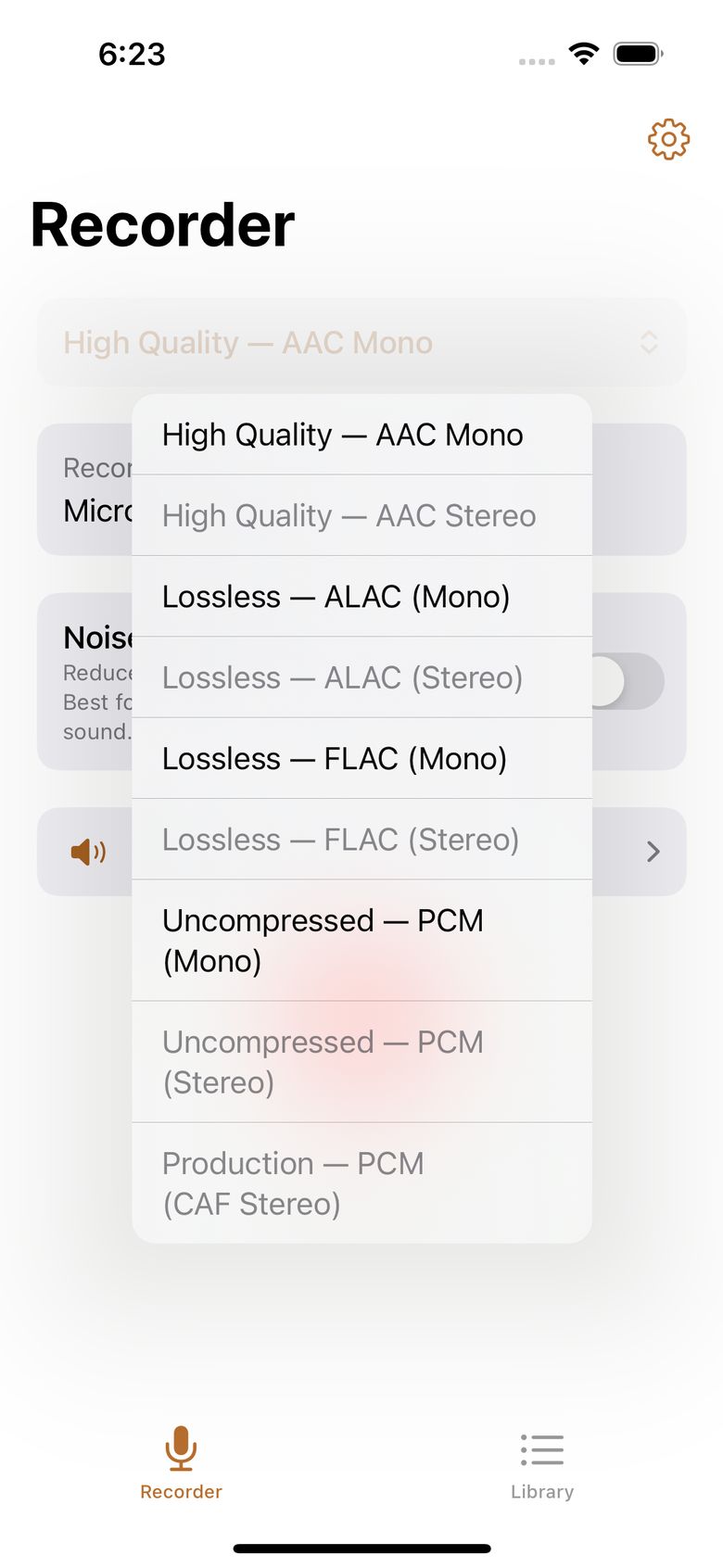
| Preset | Format | File type | Channels | Size per hour | Good for |
|---|---|---|---|---|---|
| High Quality — AAC Mono (default) | AAC | M4A | 1 | 58 MB | Voice, lectures, meetings, notes |
| High Quality — AAC Stereo | AAC | M4A | 2 | 115 MB | Stereo interview or podcast with a stereo mic |
| Lossless — ALAC (Mono) | ALAC | M4A | 1 | ~345 MB | Perfect copy that stays with Apple devices |
| Lossless — ALAC (Stereo) | ALAC | M4A | 2 | ~690 MB | Stereo perfect copy, Apple devices |
| Lossless — FLAC (Mono) | FLAC | .flac |
1 | ~345 MB | Perfect copy for any device |
| Lossless — FLAC (Stereo) | FLAC | .flac |
2 | ~690 MB | Stereo perfect copy, any device |
| Uncompressed — PCM (Mono) | PCM | CAF | 1 | 518 MB | Editing, most headroom |
| Uncompressed — PCM (Stereo) | PCM | CAF | 2 | 1040 MB | Editing, most headroom |
| Production — PCM (CAF Stereo) | PCM | CAF | 2 | 1040 MB | Video work with timecode |
All presets record at 48 kHz (a broadcast-standard quality level).
Stereo needs a mic that truly provides two channels. Stereo presets are only offered when your connected mic proves it delivers two live channels — RecordLog tells you before you start instead of failing later. The built-in iPhone mic always delivers one channel, so any stereo or two-mic preset needs an external stereo mic, a USB interface, or a wireless receiver set to stereo/split mode. If a stereo preset is selected but only one channel is present at start, the app records the matching mono version and labels the file honestly — it never writes a one-channel file with a stereo name.
Older files: recordings made with the retired Production PCM (WAV) preset still play, trim, and export normally. WAV is simply never offered for new recordings — it is a sharing format, not a recording format.
Why 48 kHz and 24-bit?
- 48 kHz (48,000 sound snapshots per second) is the film and video standard and captures the full range of human hearing. One quality level for everything means voice, music, and video projects never need converting.
- 24-bit means very wide volume range (144 dB, vs. 96 dB for CD quality): room to handle a sudden loud laugh without distorting. It is the standard for serious audio and video work.
- Because every preset uses 48 kHz, every file drops straight into a video editing timeline with no conversion.
File types explained
- M4A — home of AAC and ALAC. Universal and works well with titles, dates, and artwork.
- CAF — Apple's modern studio file. Safe for very large recordings well past 4 GB. Used for PCM masters and the Production preset.
- FLAC — the standard perfect-copy file. Best when the file needs to travel beyond Apple devices.
- WAV — the classic sharing format. Practical limit is about 4 GB (roughly 4 hours of stereo studio quality). RecordLog writes WAV only for shared copies and separate mic files — never for new recordings.
Which preset should I pick?
- Quick note, lecture, or meeting → High Quality AAC Mono (the default; 58 MB per hour).
- Stereo interview or podcast with a stereo mic → High Quality AAC Stereo.
- Two separate mics, kept apart → Dual Mono (see the Dual Mono Mics guide) with AAC Stereo or better.
- Music, or anything you might edit later → ALAC or FLAC (FLAC if the file travels to other systems, ALAC if it stays with Apple).
- Editing in audio software, most room to adjust → Uncompressed PCM (CAF).
- Recording sound for video → Production — PCM (CAF Stereo) with Video Sync timecode on.
Storage safety
The recording screen shows about how many hours you have left at your chosen preset given your actual free space. Safety rules are built in:
- Won't start below 500 MB free or under 10 minutes of space at your preset.
- Warning banner at 1 GB free or under 30 minutes left.
- Stops gracefully before space runs out (at 250 MB / 5 minutes plus a safety reserve), saving a valid file instead of letting the recording die mid-write.
- Trim, export, backup, and import check that source, output, and temporary space all fit — plus a margin — so a conversion never crashes into a full disk.
Shown sizes and times are planning estimates, not guarantees.
What you can export
- Original Format — an exact copy of the checked recording file. Never converted.
- WAV Compatibility Copy — a 16-bit WAV at the original quality level and channel count. Refused with guidance if it would pass the 4 GB classic-WAV limit. A WAV copy of a compressed recording is just for compatibility — keep the original as the true master.
- CSV Catalog (several recordings at once) — a spreadsheet-friendly list with stable IDs.
- Separate Tracks (recordings with more than one channel, like Dual Mono) — one separate 24-bit WAV per mic, kept in exact sync. Never mixed, never auto-leveled together.
- Production Metadata file — a small portable data file (JSON) with timing, timecode speed, take name, markers, and mic facts for video editing.
- Transcript files — TXT and SRT from the transcript screen.
Honest limits — the things people trip on
"Perfect copy" doesn't mean a better microphone. ALAC, FLAC, and PCM keep exactly what your mic heard — nothing more. They can't add detail the mic never picked up, and the built-in iPhone mic is not a studio mic. Choose a perfect-copy preset when you're feeding the app from a good outside mic.
Converting never improves sound. Turning an AAC file into WAV makes a WAV file that sounds exactly like the AAC — the left-out detail doesn't come back. The app says so instead of implying otherwise.
AAC compression happens once. The size saving happens at the moment of recording. After that, every copy of that M4A is identical — sharing or exporting doesn't lose more quality. But a file that started as AAC can never get its left-out detail back by converting to WAV.
No MP3 in version 1. There is no MP3 recording preset and no MP3 export. If some destination insists on MP3, export WAV or M4A and convert with any computer tool. AAC (in M4A) is the small-file format RecordLog offers.
WAV tops out around 4 GB. Classic WAV files can't pass roughly 4 GB — about 4 hours of stereo studio quality. For long studio-quality recordings the app records CAF, which has no practical limit, and refuses a WAV conversion that would pass the limit rather than making a cut-off file.
CAF isn't recognized everywhere. CAF is Apple's modern studio file and the right choice for long masters, but older or non-Apple software may not open it — use the WAV export for sharing, and ALAC/FLAC for perfect-copy sharing.
ALAC travels best with Apple. Many non-Apple apps can read ALAC, but support is weaker than FLAC's. Sending a perfect master to Windows, Linux, Android, or non-Apple editing software? Pick FLAC.
Bluetooth headset mics are limited. A Bluetooth headset mic uses the phone-call audio path — a narrower, lower-quality voice connection. The app flags this (and on newer iPhones asks for higher-quality Bluetooth recording when the mic offers it, falling back gracefully). For better quality, use the iPhone mic, a wired mic, or a USB mic. The warning is information; it never silently blocks you from recording.
Everything is 48 kHz. There are no quality sliders and no CD-style 44.1 kHz option in version 1. One level for everything means files drop straight into editing timelines — and it's the level the film and video world uses.
Four or more channels? If your USB interface provides four channels, the app handles any number of channels (labeled CH 1 through CH 4 and so on), and Separate Tracks exports one file per channel. Noise Reduction doesn't apply to these multi-channel setups in version 1 (see the Noise Reduction guide).
Dual Mono
Dual Mono records two separate mics into one two-channel file, never blended — the classic interview setup: interviewer on one side, guest on the other, both clean and in sync. It needs a mic setup that truly provides two live channels. Later, Separate Tracks exports each side as its own 24-bit WAV. Full steps: Dual Mono Mics.
Timecode and Video Sync
Six standard video speeds: 23.976, 24, 25, 29.97 NDF, 29.97 DF, and 30 frames per second. The clock shows time of day and runs freely — the app never claims a locked studio sync it can't guarantee (there is no outside timecode input in version 1). One speed uses a semicolon in its display (HH:MM:SS;FF) per video convention; the rest use colons. Markers you drop during recording save their positions and survive trimming. All of it travels in the production metadata file. Because the clock must stay truthful, Pause is turned off in Video Sync mode.