Noise Reduction
When RecordLog's Noise Reduction helps, when it doesn't, why recording can be blocked while it is on, and what is actually proven. Applied while you record, on your phone, one mic channel at a time.
Noise Reduction
Noise Reduction quiets background noise while you record — air conditioning hum, road noise, room tone, a fan. It is a while-you-record effect: applied as the sound comes in, not afterward. It runs entirely on your iPhone. No audio ever leaves your phone for it.
The control is a card on the Recorder screen:
Noise Reduction Quiets background noise while recording. Best for speech; it may change how music or room sound comes out.
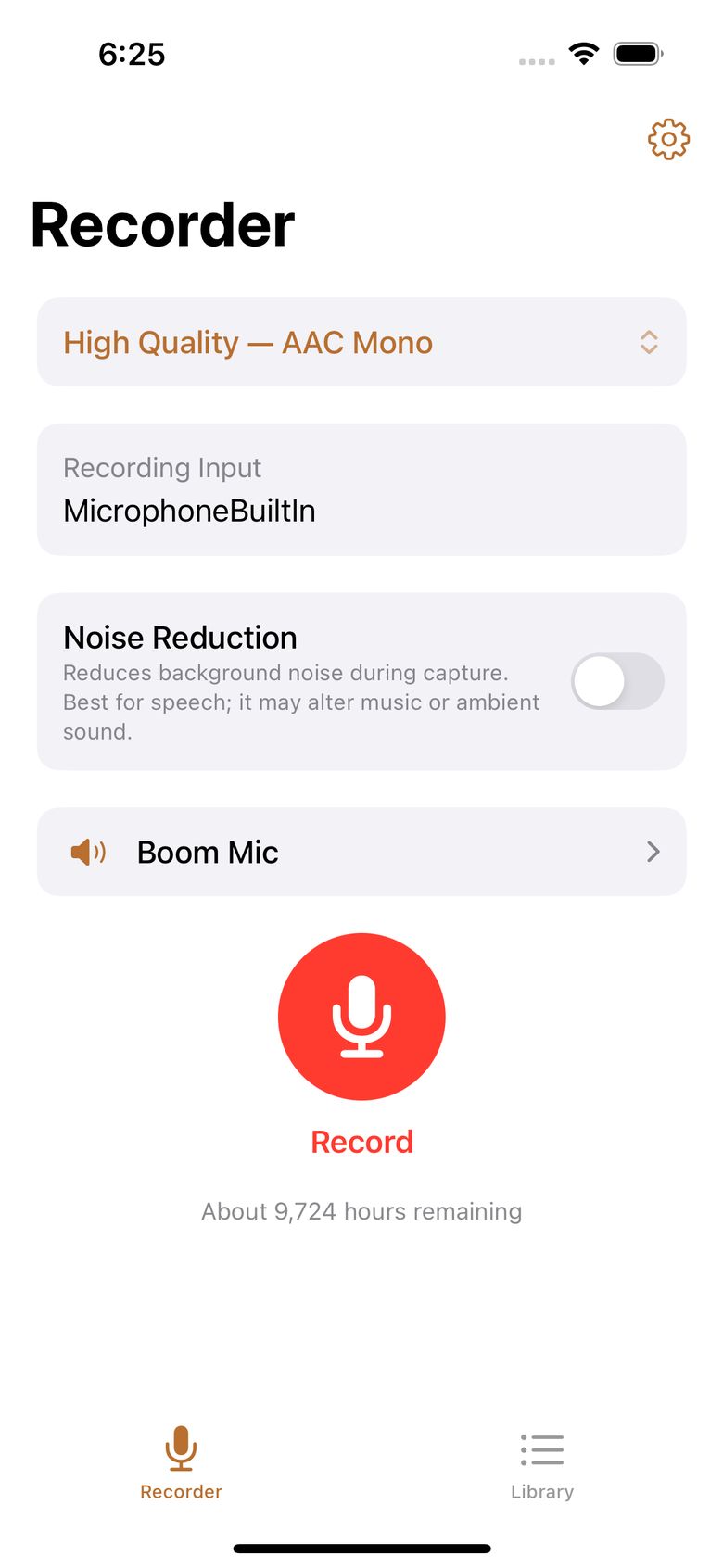
- It's off when you first install the app.
- It's one setting for the whole app: once on, it applies to future recordings until you turn it off.
- The setting locks when recording starts — you can see it (grayed out), but you can't change it mid-recording. It unlocks when you stop.
- While it is on, the app tells you that your iPhone sets the mic level automatically — there is no manual mic-volume slider in this mode, because the speech-processing path controls the level.
- Turning it on or off is a recording-settings change: after the free trial, it needs the one-time unlock (like changing the preset or mic).
When it actually works
Noise Reduction isn't a magic switch for every setup. The app picks one of two cleanup methods based on your actual mic, your chosen preset, and your channel setting — and some setups are refused with a clear explanation rather than quietly doing a worse job.
Works here:
| Your setup | What happens |
|---|---|
| Built-in iPhone mic + a mono (one-channel) preset | Apple's own speech cleanup for the built-in mic. Proven on a real iPhone 16 Pro. |
| Outside mic that provides one channel (a USB mic or wireless receiver that shows up as one channel) + a mono preset | RecordLog's own cleanup, one independent pass per channel at studio quality (48 kHz). Proven with a GoorDik J3 USB receiver (Amazon link — affiliate link; note: this set blends its two mics into one channel, so it's a single-mic setup, not Dual Mono). |
The rule is "every mono track gets its own cleanup": the built-in mic and outside one-channel mics work today. Two-mic recording itself is now proven on real hardware (BOYA Mini 2, October 2026); per-side cleanup across two channels is the last real-hardware check still open — each side would get its own independent pass, never blended together.
Doesn't work here — Record refuses to start and explains why. Nothing is recorded and no setting is changed.
| Setup with Noise Reduction on | Why it's refused |
|---|---|
| Dual Mono (two separate mics) | The two-side cleanup is written and lab-tested, but the final real-hardware test — a receiver delivering two fully separate channels — hasn't passed yet (the hardware hasn't arrived). Until it passes, this combo stays blocked. |
| Any stereo preset | Stereo cleanup is not in version 1. |
| Mic showing 4 or more channels with a mono preset | Same pending hardware test; the design exists, but this path isn't enabled. |
| Bluetooth phone-call mic | The phone-call audio path is too narrow for cleanup. |
| No recognizable mic | The app never guesses which mic you meant. |
If you tap Record with Noise Reduction on and an unsupported setup, you'll see something like:
Noise Reduction isn't available with the selected microphone or recording setup. Turn Noise Reduction off or choose a supported setup before recording.
Turn Noise Reduction off, or switch to a supported one-mic setup, and recording starts normally.
How it works
- Built-in mic: Apple's speech cleanup (the same family of technology behind call noise suppression) runs during recording. Proven on real hardware. It cleans the built-in-mic path with no outside code and no internet.
- Outside one-channel mic: RecordLog's own cleanup, built on the RNNoise engine (an open speech-cleanup method from xiph.org; its license ships in the app). It processes sound in tiny slices (480 samples at a time at 48 kHz — about 10 milliseconds of delay, too short to notice), one independent pass per channel. The measured effect is large: on the same take through the outside receiver, background hiss dropped from −55.2 dBFS to −110.1 dBFS — 55 decibels quieter (dBFS is just "how loud vs. the loudest possible digital sound" — lower means quieter background) — while speech stayed intact and files with cleanup off stayed byte-identical. On the built-in mic, background dropped from −49.9 dBFS to digital silence with speech preserved. It runs fast: roughly 200 microseconds of work per slice.
What we can honestly say is proven
RecordLog never overclaims. Proven on a real iPhone 16 Pro (September 2026): built-in-mic cleanup and outside one-channel cleanup, including what happens during a phone-call interruption, a mic unplug, and a locked screen. The two-channel cleanup is proven on lab-made two-channel audio with real speech, and two-channel recording itself is now proven on real hardware (BOYA Mini 2, two separate channels from one receiver, October 2026). The last check still open is per-side cleanup across two real channels — this page will be updated the day it passes. Every sentence here stays inside what the app has actually demonstrated.
Boom Mic never uses Noise Reduction
Boom Mic sessions never apply Noise Reduction — not to the live speaker sound and not to anything recorded with Also Record, no matter what your saved setting is. If your setting is on, the Boom Mic screen says plainly that it's off for this session. Your saved setting is left exactly as you set it. (Reason: the Boom Mic live path is tuned for minimum delay over Bluetooth; adding the cleanup step would fight that delay budget.) See Boom Mic.
Questions
Does Noise Reduction upload my audio? No. It runs entirely on your iPhone. No audio leaves the phone — matching RecordLog's overall privacy (no account, no tracking, no RecordLog server).
Does it work when I record with two lapel mics? Recording with two lapel mics works — proven with the BOYA Mini 2 (October 2026). Per-side cleanup is the built design (each mic gets its own pass; the two are never blended), but turning it on for two separate channels from one receiver needs the final real-hardware check, which is the one test still open. The day it passes, this answer changes. Every one-mic use (built-in mic, outside one-channel mics) works today.
Will it help the written transcript? Cleaner speech is generally better input for speech recognition — but the app makes no accuracy promise. Transcript quality is Apple's domain; Noise Reduction is a recording feature.
I record music. Should I turn it on? Probably not. The on-screen caption says it: best for speech; it may change how music or room sound comes out. The cleanup is tuned for voices. For music or room ambience, record untouched (usually with a perfect-copy preset).
My mic already has noise reduction built in. Should I still turn this on? No — use one or the other, never both. Stacking the mic's own cleanup with the app's ("double" noise reduction) makes voices worse, not better: each pass expects natural background and carves away more of the speech. If your mic has its own noise reduction switched on, leave RecordLog's off, and vice versa.
Why is the record button blocked while it's on? Because your current setup isn't a supported combination. Read the on-screen reason — it names it: Dual Mono, stereo preset, multi-channel mic, Bluetooth phone-call mic, or an unrecognized mic. Turn Noise Reduction off or change the setup. Nothing else was changed.
Can I adjust mic volume while it's on? No — while it's on, your iPhone sets the mic level automatically, and the app says so on the control. For a manual mic level, turn Noise Reduction off.
Does it apply to old recordings? No. It only works while recording. Anything already recorded stays exactly as captured — it never runs as an edit afterward.
Does it change my file format? No. You still get whatever file type you picked (AAC, ALAC, FLAC, or PCM). The cleaned-up sound is what's written, at 48 kHz, and the file's true channel count is always reported honestly.